Android APK 签名扫盲

前置知识

PKCS#7X.509DER 、PEM数字签名数字证书 这些都是在处理公钥加密、数字签名时,常见的一些名词,但是我一直对他们不甚了解,尤其是前面两个。下面的内容是对它们的一些介绍。

DER 和 PEM

首先,二者都是常用的用于公钥密码密钥/证书的编码方式,而且可以相互转换。

DER

DER:Distinguished Encoding Rules,可分辩编码规则。具体来说,DER 是对 ASN.1 值的一种二进制编码方式。

在电信和计算机网络领域,ASN.1(Abstract Syntax Notation One) 是一套标准,是描述数据的表示、编码、传输、解码的灵活的记法。它提供了一套正式、无歧义和精确的规则以描述独立于特定计算机硬件的对象结构。

PEM

PEM:Privacy-Enhanced Mail,隐私增强邮件。简单来说,PEM就是对DER数据进行 Base64 编码后,前后加上头。格式如下:

-----BEGIN <???>-----
<Base64 编码后的 DER 数据>
-----END <???>-----

数字证书 和 X.509

数字证书

数字证书是在 Internet 上唯一地标识人员和资源的电子文件。数字证书可以防止中间人攻击,具体的介绍可以看下面的链接:数字证书简介

X.509

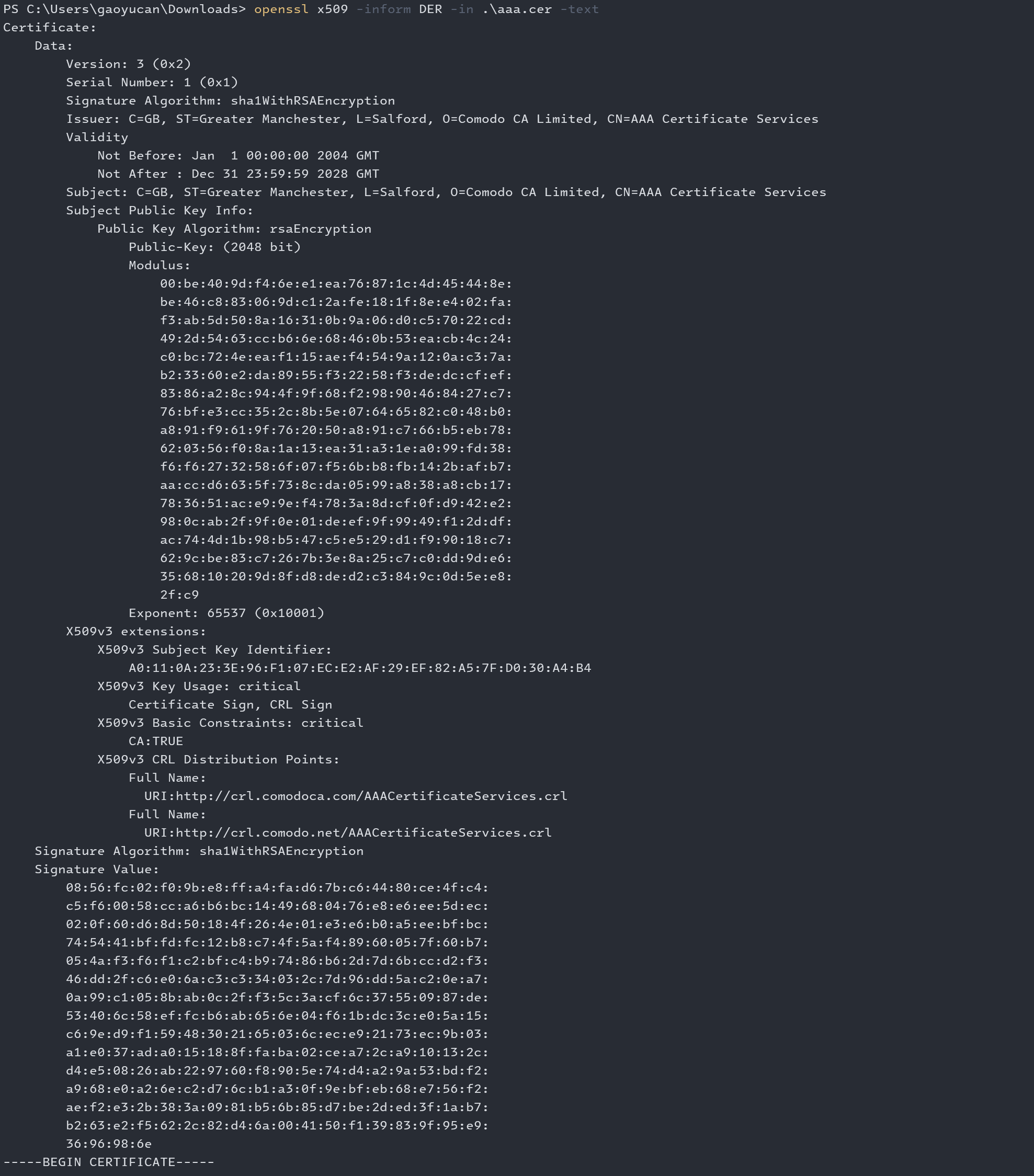
X.509 是数字证书的一种标准格式,通俗来说就是一种数字证书的发布者、公钥等信息的组织形式。下图就是一个 X.509 格式的数字证书的内容:

image-20240214213040934.png

数字签名 和 PKCS#7

数字签名

什么是数字签名,以及它和数字证书的关系。参考:数字签名是什么?

PKCS#7

在密码学中,PKCS#7是用于存储签名或加密数据 标准语法。我个人的理解是,在传输签名后的数据时,我们传输的数据需要包括:原文、数字证书(在 PKCS#7 中就是 X.509 格式的)、签名算法(如 RSA Signature with SHA-256)、签名数据等数据,而PKCS#7 就是规定了这些数据的组织形式的一个标准。

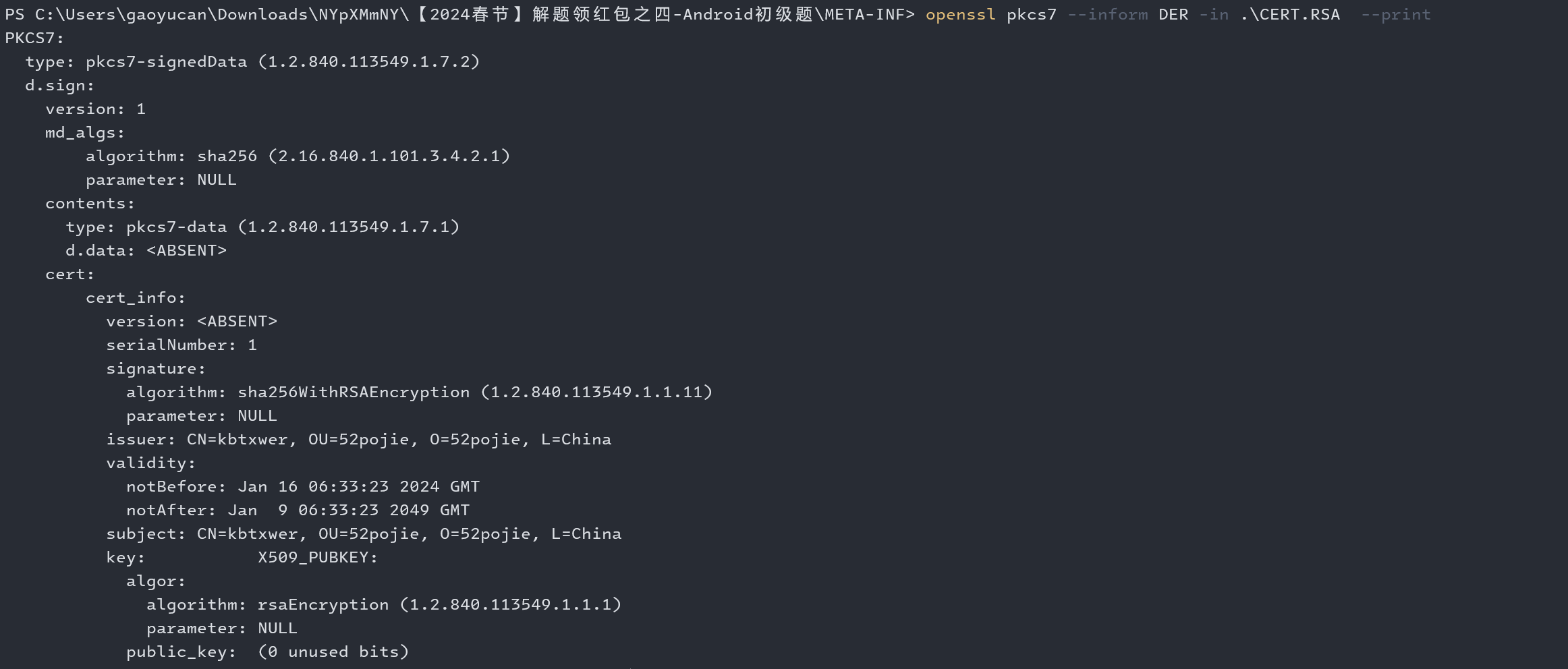
我们可以使用 openssl 工具对 PKCS#7格式的数据,进行解析、展示:

openssl pkcs7 --inform DER -in [der 格式的签名文件路径] --print

image-20240214210547926.png

正题

这里主要是为了解答我自己的这么几个问题:

  • 在日常开发中,通过 PackageInfo.signatures 拿到的是什么?
  • Android 的签名验证机制是如何工作的?

阅读以下内容之前,请先阅读下文:Android 签名机制 v1、v2、v3

好,看完后第二个问题解决了。🤣

问题一

分析

分析源代码写的很乱,可以自己看省流

第一个问题还是不知道,通过对 Android 源代码的最终发现,PackageInfo.signatures 是在 PackageParser 这个类进行的赋值,而 PackageParser 则是使用 ApkSignatureVerifier#verify 这个方法获取的签名信息。这个类中依次尝试使用 V4V3V2V1对apk 进行签名校验,我们这里挑最具通用性,也最容易理解的 V1 来进行阅读。

V1、V2、V3、V4 签名,参考 Android 官方文档:应用签名

首先,获取 apk 文件 META-INF 目录下,以 RSA、DSA、EC 为拓展名的文件,作为"证书文件"。以 CERT.RSA 为例,接下来就会获取 CERT.SF 文件内容,然后校验 CERT.SF文件内容。

前面提到了 PKCS#7,CERT.RSA 就是 PKCS#7 格式的签名数据,其中包括数字证书、签名算法(如 RSA Signature with SHA-256)、签名数据等数据,可以说除了原文该有的基本都有。而原文就是 CERT.SF 的文件内容。

然后是使用签名文件(SF 文件)检验 MF 文件没有被修改过,并把SF文件和其对应的证书链对应起来了,还有把SF文件和SF文件中所包含的文件对应起来(看起来好像是一个文件可能被多个 SF 文件包含,但是我没见过)。

private void verifyCertificate(String certFile) {
// Found Digital Sig, .SF should already have been read
String signatureFile = certFile.substring(0, certFile.lastIndexOf('.')) + ".SF";
byte[] sfBytes = metaEntries.get(signatureFile);
if (sfBytes == null) {
return;
}

byte[] manifestBytes = metaEntries.get(JarFile.MANIFEST_NAME);
// Manifest entry is required for any verifications.
if (manifestBytes == null) {
return;
}

byte[] sBlockBytes = metaEntries.get(certFile);
try {
Certificate[] signerCertChain = verifyBytes(sBlockBytes, sfBytes);
if (signerCertChain != null) {
certificates.put(signatureFile, signerCertChain);// 等下用到了
}
} catch (GeneralSecurityException e) {
throw failedVerification(jarName, signatureFile, e);
}

// Verify manifest hash in .sf file
Attributes attributes = new Attributes();
HashMap<String, Attributes> entries = new HashMap<String, Attributes>();
try {
StrictJarManifestReader im = new StrictJarManifestReader(sfBytes, attributes);
im.readEntries(entries, null);
} catch (IOException e) {
return;
}

// If requested, check whether a newer APK Signature Scheme signature was stripped.
if (signatureSchemeRollbackProtectionsEnforced) {
// 无关,省了
}

// Do we actually have any signatures to look at?
if (attributes.get(Attributes.Name.SIGNATURE_VERSION) == null) {
return;
}

boolean createdBySigntool = false;
String createdBy = attributes.getValue("Created-By");
if (createdBy != null) {
createdBySigntool = createdBy.indexOf("signtool") != -1;
}

// Use .SF to verify the mainAttributes of the manifest
// If there is no -Digest-Manifest-Main-Attributes entry in .SF
// file, such as those created before java 1.5, then we ignore
// such verification.
if (mainAttributesEnd > 0 && !createdBySigntool) {
String digestAttribute = "-Digest-Manifest-Main-Attributes";
if (!verify(attributes, digestAttribute, manifestBytes, 0, mainAttributesEnd, false, true)) {
throw failedVerification(jarName, signatureFile);
}
}

// Use .SF to verify the whole manifest.
String digestAttribute = createdBySigntool ? "-Digest" : "-Digest-Manifest";
if (!verify(attributes, digestAttribute, manifestBytes, 0, manifestBytes.length, false, false)) {
Iterator<Map.Entry<String, Attributes>> it = entries.entrySet().iterator();
while (it.hasNext()) {
Map.Entry<String, Attributes> entry = it.next();
StrictJarManifest.Chunk chunk = manifest.getChunk(entry.getKey());
if (chunk == null) {
return;
}
if (!verify(entry.getValue(), "-Digest", manifestBytes,
chunk.start, chunk.end, createdBySigntool, false)) {
throw invalidDigest(signatureFile, entry.getKey(), jarName);
}
}
}
metaEntries.put(signatureFile, null);
signatures.put(signatureFile, entries);// 把SF文件和SF文件中所包含的文件对应起来
}

然后,获取 AndroidManifest.xml 文件对应的 ZipEntry, 调用 loadCertificates函数,结果经过 convertToSignatures 得到的结果就是 PackageInfo.signatures

看来关键就在于 loadCertificates 这个函数了,

private static ParseResult<Certificate[][]> loadCertificates(ParseInput input,
StrictJarFile jarFile, ZipEntry entry) {
InputStream is = null;
try {
// We must read the stream for the JarEntry to retrieve
// its certificates.
is = jarFile.getInputStream(entry);
readFullyIgnoringContents(is);
return input.success(jarFile.getCertificateChains(entry));
} catch (IOException | RuntimeException e) {
return input.error(INSTALL_PARSE_FAILED_UNEXPECTED_EXCEPTION,
"Failed reading " + entry.getName() + " in " + jarFile, e);
} finally {
IoUtils.closeQuietly(is);
}
}

首先是题外的,readFullyIgnoringContents 是在干什么呢? 读了又不要,很奇怪吧。其实 jarFile.getInputStream 获取的是 StrictJarFile.JarFileInputStream

public InputStream getInputStream(ZipEntry ze) {
final InputStream is = getZipInputStream(ze);

if (isSigned) {
StrictJarVerifier.VerifierEntry entry = verifier.initEntry(ze.getName());
if (entry == null) {
return is;
}

return new JarFileInputStream(is, ze.getSize(), entry);
}

return is;
}

这里还有一个比较关键的函数 initEntry,它把 MANIFEST.MF 文件的解析结果(包括摘要算法、摘要值)、对这个 entry 进行签名的证书链(一般都是自签名的就一个,也没链)列表(也就是 .SF 列表,一般来说就一个)融入到了 Entry 中。

  VerifierEntry initEntry(String name) {
// If no manifest is present by the time an entry is found,
// verification cannot occur. If no signature files have
// been found, do not verify.
if (manifest == null || signatures.isEmpty()) {
return null;
}

Attributes attributes = manifest.getAttributes(name);
// entry has no digest
if (attributes == null) {
return null;
}

ArrayList<Certificate[]> certChains = new ArrayList<Certificate[]>();
Iterator<Map.Entry<String, HashMap<String, Attributes>>> it = signatures.entrySet().iterator();
while (it.hasNext()) {
Map.Entry<String, HashMap<String, Attributes>> entry = it.next();
HashMap<String, Attributes> hm = entry.getValue();
if (hm.get(name) != null) {
// Found an entry for entry name in .SF file
String signatureFile = entry.getKey();
Certificate[] certChain = certificates.get(signatureFile);
if (certChain != null) {
certChains.add(certChain);
}
}
}

// entry is not signed
if (certChains.isEmpty()) {
return null;
}
Certificate[][] certChainsArray = certChains.toArray(new Certificate[certChains.size()][]);

for (int i = 0; i < DIGEST_ALGORITHMS.length; i++) {
final String algorithm = DIGEST_ALGORITHMS[i];
final String hash = attributes.getValue(algorithm + "-Digest");
if (hash == null) {
continue;
}
byte[] hashBytes = hash.getBytes(StandardCharsets.ISO_8859_1);

try {
return new VerifierEntry(name, MessageDigest.getInstance(algorithm), hashBytes,
certChainsArray, verifiedEntries);
} catch (NoSuchAlgorithmException ignored) {
}
}
return null;
}

而 JarFile.JarFileInputStream 的 read 方法是经过重写的

		// JarFileInputStream 类
@Override
public int read() throws IOException {
if (done) {
return -1;
}
if (count > 0) {
int r = super.read();
if (r != -1) {
entry.write(r);
count--;
} else {
count = 0;
}
if (count == 0) {
done = true;
entry.verify();// 关键
}
return r;
} else {
done = true;
entry.verify();
return -1;
}
}
// VerifierEntry 类
void verify() {
byte[] d = digest.digest();
if (!verifyMessageDigest(d, hash)) {
throw invalidDigest(JarFile.MANIFEST_NAME, name, name);
}
verifiedEntries.put(name, certChains);// 把文件和对他进行签名的证书对应起来
}

所以这个调用是为了检查 APK 中包含的所有文件,对应的摘要值与 MANIFEST.MF 文件中记录的值是否一致。

回归正题,getCertificateChains 方法获取了转换所需的 Certificate[][] ,他的很简单,其实就是从前面代码中的verifiedEntries中获取对应 entry 的 certChains。

好的总结一下,我的理解就是获取的对 AndroidManifest.xml 这个文件进行签名的证书。在一般情况下,就是 CERT.RSA 文件(PKCS#7格式)中的证书部分。

那么 convertToSignatures 做了什么呢?

  private static Signature[] convertToSignatures(Certificate[][] certs)
throws CertificateEncodingException {
final Signature[] res = new Signature[certs.length];
for (int i = 0; i < certs.length; i++) {
res[i] = new Signature(certs[i]);
}
return res;
}

public Signature(Certificate[] certificateChain) throws CertificateEncodingException {
mSignature = certificateChain[0].getEncoded();
if (certificateChain.length > 1) {
mCertificateChain = Arrays.copyOfRange(certificateChain, 1, certificateChain.length);
}
}

/**
* Returns the encoded form of this certificate. It is
* assumed that each certificate type would have only a single
* form of encoding; for example, X.509 certificates would
* be encoded as ASN.1 DER.
*
* @return the encoded form of this certificate
*
* @exception CertificateEncodingException if an encoding error occurs.
*/
public abstract byte[] getEncoded()
throws CertificateEncodingException;

省流

好,PackageInfo.signatures 得到其实就是公钥数字证书转换为 DER 格式的二进制数据。
Python 可以直接用 androguard 获取,

from androguard.core.apk import APK

apk = APK('abc.apk')
signature = apk.get_certificates()[0].dump()
print(signature.hex())

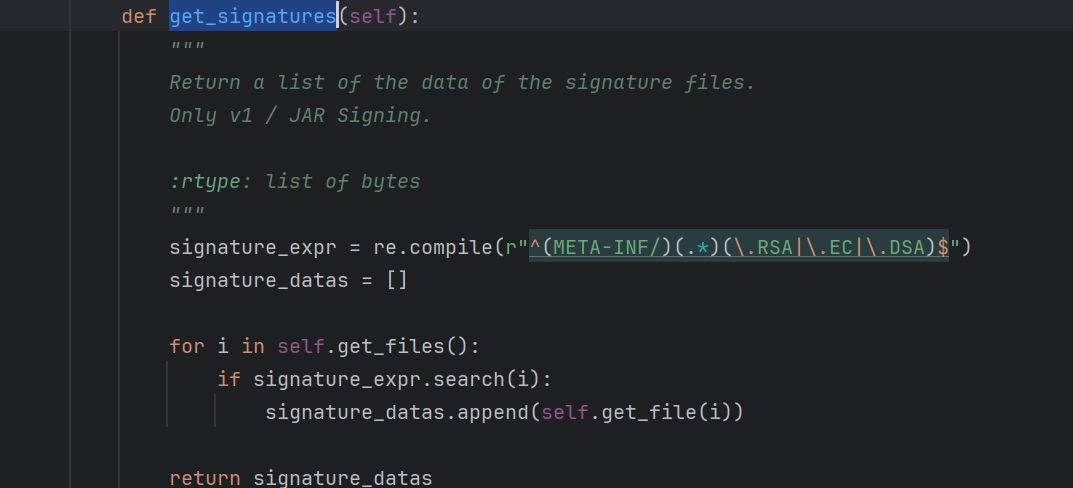
注意!其提供的 get_signatures 是不对的,如下图它直接返回了签名数据的全部内容,而我们需要的只有公钥数字证书部分。

image-20240214233626269.png